DJing
October 8, 2026
Mixing Vinyl in Key: The Complete Guide
Our complete guide on how vinyl DJs manage mixing in key despite pitch changes
By Buster Bennett, Founder of London Sound Academy
Buster has been DJing since the early 2000s and founded LSA in 2009. He is a senior tutor for LSA's Vinyl DJ Course and writes about the practical side of mixing.
Vinyl DJing and Mixing in Key: The Complete Guide to Harmonic Mixing
Many DJs who have learnt how to DJ with digital players are now exploring how to mix vinyl. One of the biggest questions new vinyl DJs ask me is 'How do vinyl DJs mix in key?' The answer is not so straightforward. In this blog, I will cover various strategies that vinyl DJs will use to manage harmony within their sets.
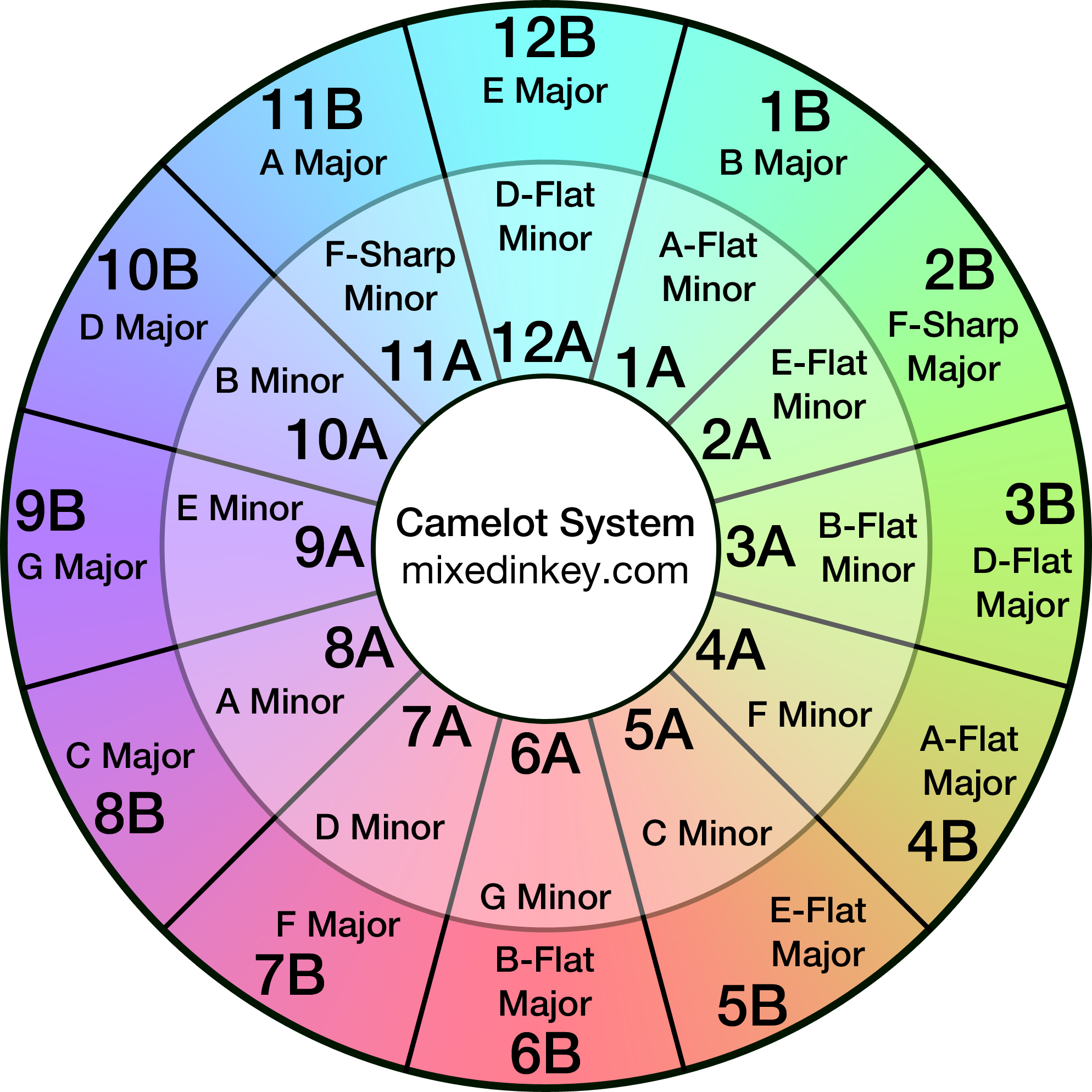
Most digital DJs use software like Rekordbox or Serato to analyse their tracks and detect keys. They can choose to show the key in the classic way, such as A minor, or with alphanumeric keys such as 8A. They then use key-lock features so that any change to the tempo, won't affect the key. This enables digital DJs to easily mix in key by simply matching keys with the Camelot Wheel popularised by Mixed in Key 2000s but invented by Mark Davis in the 1990s. However, vinyl DJs can't lock the key.
The Problem For Vinyl DJs: Pitch and Key Are the Same Control
On a turntable, tempo and pitch are inseparable. Speeding and slowing down a track changes the pitch, in other words, it changes the key. The biggest giveaway is the vocal, when you speed up your vinyl record (increase the BPM) the vocals will pitch up and sound like they are singing on helium giving you the chipmunk effect. You'll also notice when you adjust the platter or record to align the beats as it gives off a pitch-bending sound, making it obvious you are trying to fix the beat match. You'll hear the same effect on a CDJ if you turn Master Tempo (Key Lock) off.
So the problem is that even if you know the key of your track, as soon as you change the BPM to beat match with another track, you're changing the key. Change the key too much and it won't harmonise. This fundamental restriction vinyl DJs face shapes everything about how they manage mixing harmonically.
Pitch Change and Key Shift on Vinyl: How Much Is Too Much?
Most turntables such as the Technics 1210s, allow you to increase or decrease the pitch by 8%. Some modern turntables like the Pioneer PLX1000s allow you to change the pitch up to 50%.
Why ±8% is the standard range
±8% pitch range gives enough room to beatmatch the vast majority of tracks within a chosen genre. Tracks within their own genre such as House, Techno, DnB and Hip Hop typically sit within 5–10 BPM of each other, so a ±8% pitch range is enough to change the BPM so two tracks can beatmatch.
At the same time, ±8% keeps the fader's resolution fine enough for precise adjustment. On a typical turntable, that range is about 1mm of movement per 0.1% of pitch. That's enough sensitivity for DJs to match the tempo close enough for long DJ mixes.
So the question is now, how much can you change the pitch before the key noticeably changes?
The exchange rate is roughly 6% tempo change for one semitone of pitch shift. This number is the foundation of every key-mixing strategy on vinyl.
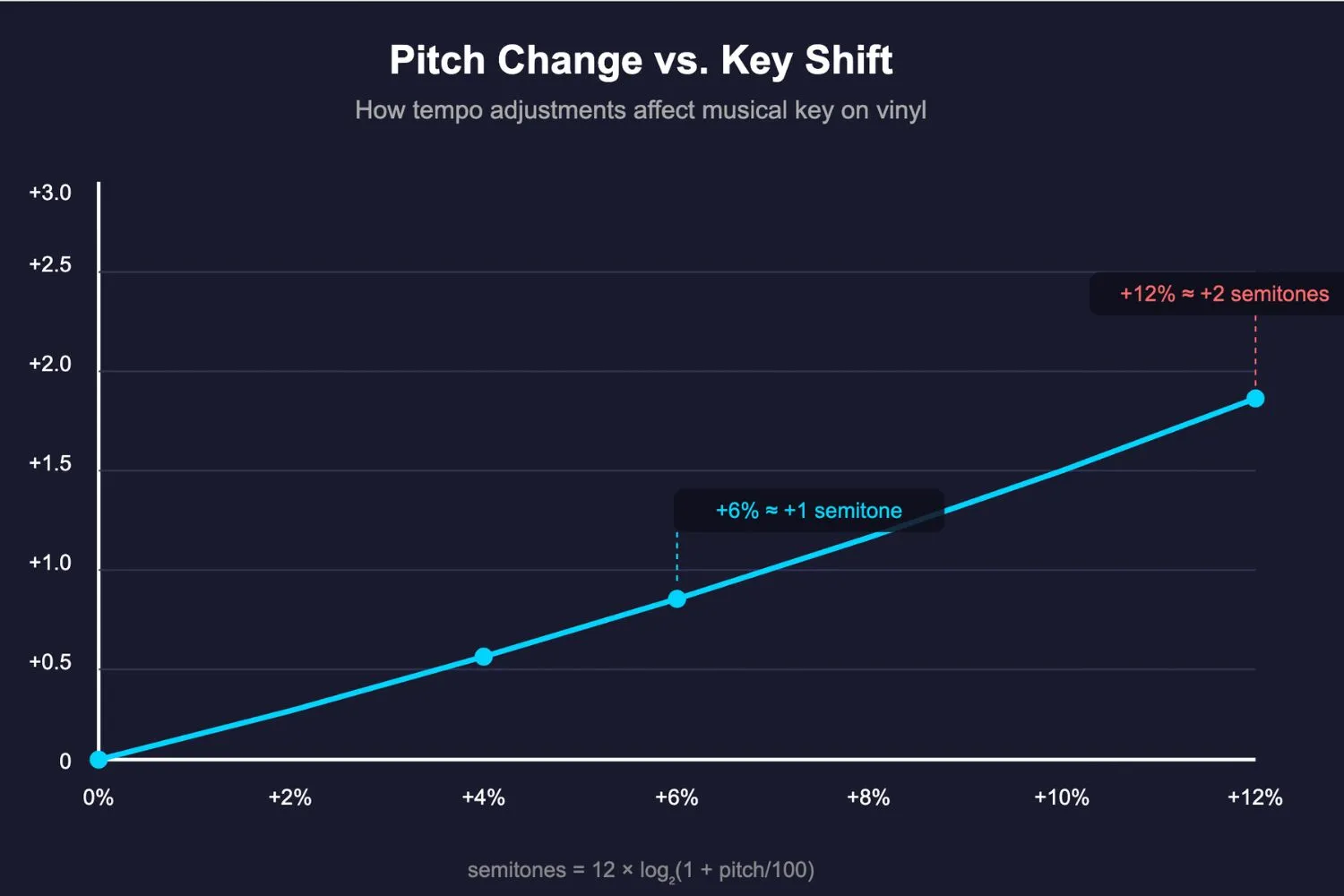
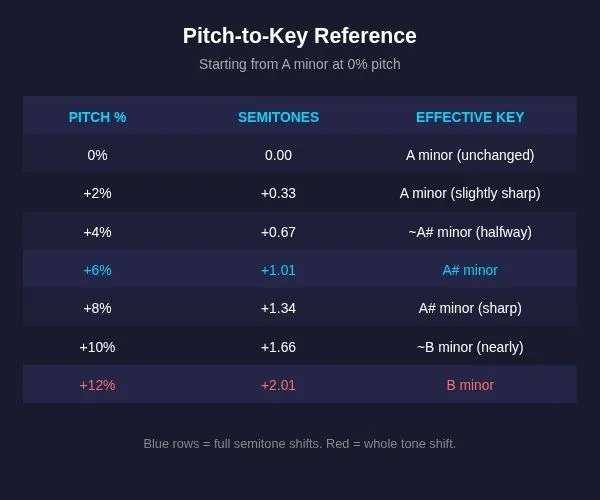
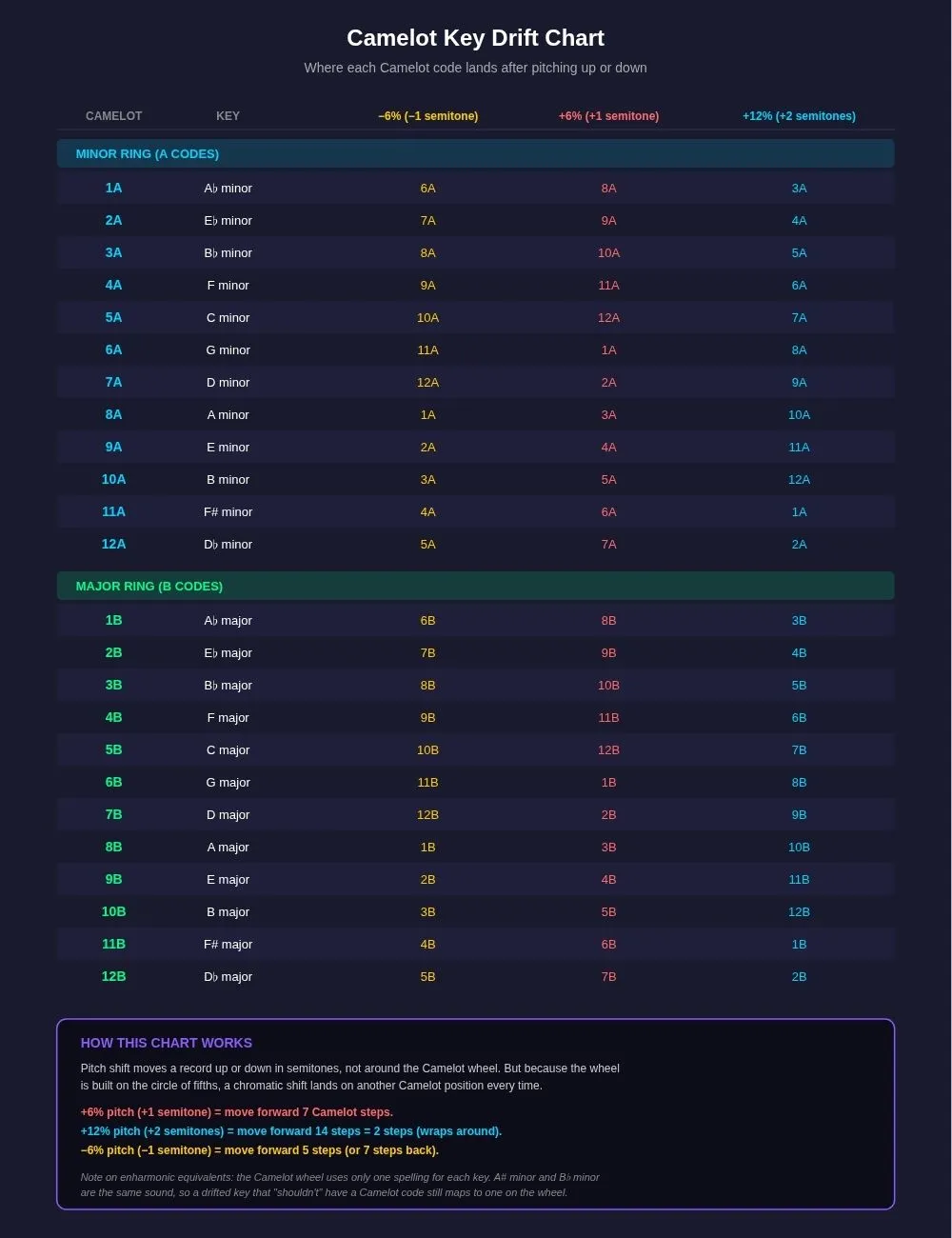
Don't get confused between musical keys and alphanumeric keys. One semitone up or down doesn't mean one position forward or back on the Camelot Wheel. Musical keys are things like A minor and B♭ minor. Alphanumeric keys are the Camelot codes like 8A and 3A. They describe the same things in different ways. Here is what that looks like with alphanumeric keys with a -6% or +6% pitch adjustment
Why ±6% Is Where Your Key Changes
Let's imagine you have two tracks that are the same key and both 128 BPM. If you mix them together at their normal BPM they will harmonise without issue. The problem is not every track is the same BPM and you don't want to be mixing the same key all night. So, what is the safe range we can use to beatmatch tracks without pushing the key too far?
Using 128 BPM as an example starting point, the standard ±8% pitch fader range spans approximately 118 BPM to 138 BPM. If you beatmatch within the ±4% range, which represents up to just over half a semitone of pitch shift, you're in the safe zone and the track is still effectively in the same starting key. Most listeners won't notice any compromise.
If you push into the ±6% range, you've hit a full semitone. The track is no longer in its original key, it's moved seven steps around the Camelot wheel. Whether that new key works depends on the key of the other track.
If both tracks were the same key to start with, the shifted track will land on a key that is a perfect fifth away from the original. This is a strong harmonic relationship, but on the Camelot wheel it represents a large jump (7 steps), not a smooth, adjacent blend.
If your next track is close to that new key, the shift has moved you somewhere useful. If it's still in the original key, you'll need to work around the gap.
However, you have to account for pitch changes on both turntables. The ±6% threshold applies to the difference between the two pitch settings. If one track is at +4% and the other at −2%, the separation between them is 6%, which puts you right at the threshold.
Remember, we're not trying to make all the tracks the same key. For a successful DJ set you need to move around the keys, to add harmonic progression and interest into your DJ set.
What happens to your alphanumeric key when you pitch up 6%
Pitching up by +6% shifts the key up one semitone. On the Camelot wheel, one semitone up happens to land seven steps forward, the position that represents a perfect fifth. That's because the wheel is built on the circle of fifths, so the semitone shift and the fifth interval overlap at the same point on the wheel. It looks like a big jump on paper, but the harmony still works.
So a track that is 8A (A minor) pitched up by +6% is now sounding in 3A (B♭ minor). That's a jump of seven steps around the Camelot wheel, which sounds dramatic but lands you in a key that still shares enough notes with the original to harmonise. It's a different type of harmonic relationship, but not a clash, so it still sounds good.
What happens to your alphanumeric key when you pitch down 6%
Pitching down by −6% shifts the key down one semitone. Because the wheel wraps around in a circle, moving down seven steps is the same as moving five steps forward. So a track that is 8A (A minor) pitched down by −6% is now sounding in 1A (A♭ minor).
Again, a big jump of five steps on the Camelot wheel but still within the harmonic neighbourhood. The track has shifted down one semitone, from A minor to A♭ minor.
What happens if both turntables are pitched
When you're beatmatching, both tracks are usually pitched, one up, one down, or both in the same direction but by different amounts. The distance between them is the difference between their two shifts.
Example where both tracks are 8A: Turntable A is at +4%, Turntable B is at −4%. Both tracks started in 8A. That puts them 8% apart in pitch terms, roughly 1.36 semitones, or more than a full semitone of separation.
If both turntables had been at +4%, the picture would be different. Both tracks would have shifted up by the same amount, and the gap between them would be zero. They'd still be harmonically aligned with each other, even though both have shifted slightly sharp of their original key.
How to Realistically Mix in Key with Vinyl
Keep both pitch faders as close to 0% as possible. A ±2% adjustment is roughly a third of a semitone, so barely noticeable. A ±6% adjustment is a full semitone and will meaningfully change the key of the track. If you can beatmatch by choosing tracks that are already close in BPM and close on the Camelot wheel, you'll stay within the harmonious zone without having to think about it.
Once you go beyond ±6%, the track has moved a full semitone or more from the key on its label. The harmony between the two tracks is still valid, but the label is no longer accurate, so you can't trust the Camelot code when choosing your next track.
Most Vinyl DJs Are Winging It
Mixing vinyl in key is complicated and rather than exit the flow state of mixing for a quick mathematical equation, most DJs will just trust their ear. When you practice mixing vinyl, you will combine many different tracks together. Some of them will work harmoniously, and others not. Remember the tracks that do work together and start building small segments. As you practice more, you'll start finding longer combinations of tracks that work well, two, three, four or more tracks in a row. You can tell by ear if they are working or not.
This trial and error method is how the vast majority of vinyl DJs manage mixing in key. Those that are more concerned about key clashes will often start by labelling and organising their music in advance.
Labelling and Organising Vinyl for Harmonic Mixing
Digital DJs have it easy: software detects the key and BPM and writes it into the metadata. When DJing, they simply use key lock so they can change the BPM as much as they want.
Vinyl DJs have to do this work manually and understand how pitching your track changes the key. To overcome this complexity vinyl DJs will need to find a way of labelling their records.
How to find the key and BPM of your tracks
The easiest way to organise your record collection is to have a digital version. Some vinyl purchases come with a QR code to download a digital version. If they don't you can consider recording the record into a digital format or buying a digital copy. Granted, this can add extra expense but it does make things easier.
If you have access to the digital version of the tracks, such as an MP3 version, you can then put them into DJ software like Rekordbox and pull the key and BPM info. Failing that, you can search online for the data. It's normally easy to find but might be hard for some of the more rare records. Remember, that most vinyl DJs don't bother, they just do it all spontaneously by ear. It really depends on the DJs preference on how to do this.
How to label your record
A label is a great way to speed up track selection when playing a vinyl DJ set. The best way to label your records is by putting your record in a plastic sleeve, and placing a sticky label on the plastic. This way, you don't ruin the artwork. However, you need to make sure you always put your records back in the right sleeve.
I recommend that you write down the Name of the artist, name of the release, genre, BPM, musical key and the alphanumeric key.
Digital Planning, Analog Execution
A modern approach for vinyl DJs who care about harmonic mixing is digital planning. You can use DJ software to analyse, plan, and build sequences, but execute the set on turntables with an awareness that every pitch adjustment is also a key adjustment.
I hope you enjoyed reading this guide about mixing vinyl in key. I have also written some other useful blogs for aspiring vinyl DJs. Click the links below to learn more about vinyl mixing.